When the SEO title is empty, Shopify falls back to the product title; when the meta description is empty, search engines invent one from the page. Both are worse than a deliberate line written for the category.
Because these fields are per product, filling them in is exactly the sort of repetitive work that belongs in a filtered bulk task.
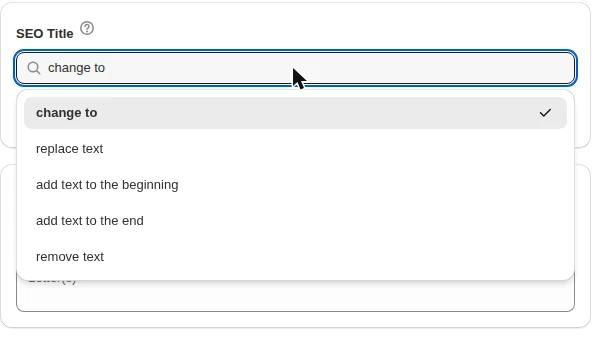
SEO field operations
- Change to — set a title or description template for a filtered group.
- Find and replace — fix a phrase, a brand name or a year across every meta description.
- Add to the beginning or end — append a qualifier such as “Free UK delivery”.
- Remove text — strip an expired claim.
- The length cap on these fields is enforced, so a task cannot write a value Shopify would reject.
Find every product with an empty SEO title and fix them in one task.
You will be redirected to the Shopify app store.
Finding the gaps
- Where the SEO title is empty — the products relying on the fallback.
- Where the SEO description is empty — the ones search engines are guessing about.
- By product type or collection, so each category gets wording that suits it.
- By vendor for brand-led copy.
- By creation date to catch a recent import.
A worked example: backfill missing meta descriptions for one category
- Filter: product type is “Running shoes”, SEO description is empty.
- Editor: SEO description → change to a category line that mentions fit, delivery and returns.
- Preview the matched products and check the count against what you expected.
- Run it, then repeat for the next category with wording of its own.
Templates beat identical text
Writing one sentence per category and applying it to that category beats one sentence for the whole store: the copy stays relevant, and you avoid thousands of identical meta descriptions.
Where a product deserves bespoke copy, exclude it from the filter — the preview step exists for exactly this.
How to bulk edit SEO titles and meta descriptions, step by step
- Find the gaps. Filter products where SEO title or SEO description is empty.
- Choose the field. SEO title or SEO description.
- Choose the action. Change to a fixed text, add text to the beginning or end, find and replace, or remove a piece of text.
- Preview. Check a sample — especially length and brand suffix.
- Run. The log keeps the previous text, so the change can be reverted.
What Shopify shows when the SEO field is empty
If a product has no SEO title, Shopify uses the product title. If it has no SEO description, Shopify uses the product description truncated to 320 characters. That fallback is often good enough — and often a shipping notice or size chart, which is why filling the field matters.
Patterns that work
| Goal | Action | Example result |
|---|---|---|
| Brand suffix | add text to the end | Linen Shirt — Navy | Northwind |
| Seasonal keyword | add text to the beginning | Winter Sale: Wool Scarf |
| Rename a range | find “Tee” replace with “T-shirt” | Organic Cotton T-shirt |
| Remove an old promo | remove text “– 20% off” | Leather Belt |
Length guidelines
- SEO titles: aim for 50–60 characters; Google rewrites longer ones.
- Meta descriptions: 140–160 characters, written for the click, not for keywords.
- Keep the product name first; brand and modifiers after it.
Find and replace without surprises
- Type the text exactly as it appears in the field, including punctuation such as “–” and “|”.
- When adding text to the beginning or end, include the space or separator yourself: “ | Northwind”, not “Northwind”.
- Filter values are limited to 255 characters.
- Run on a small filtered set first and read the log — it shows the old and new text side by side.
A worked example: the yearly update
| Before | Action | After |
|---|---|---|
| Wool Scarf – Winter 2025 | Northwind | replace text “2025” with “2026” | Wool Scarf – Winter 2026 | Northwind |
| Free UK delivery until 24 Dec – Leather Belt | remove text “Free UK delivery until 24 Dec – ” | Leather Belt |
| Linen Shirt | add text to the end “ | Northwind” | Linen Shirt | Northwind |
| Organic Tee | replace text “Tee” with “T-shirt” | Organic T-shirt |
Scope year updates with a filter — a tag or collection of the seasonal range — so a replace does not touch product names that contain the number for another reason.
A meta description formula that earns the click
Search results show about 150 characters. Spend them on what the shopper is comparing: what the product is, the attribute that matters in this category, and a reason to buy here.
| Category | Template |
|---|---|
| Running shoes | Lightweight running shoes with cushioned soles. Free returns within 30 days and delivery in 2–3 days. |
| Furniture | Solid oak furniture made to order. Free delivery to your room of choice and a 10-year frame guarantee. |
| Skincare | Fragrance-free skincare for sensitive skin. Dermatologist tested, vegan, with free samples in every order. |
Apply one template per category with a filter on product type or collection, then write bespoke copy for the top sellers by hand and exclude them from the next run.
Checking the result
- In Shopify admin, open a product and look at the search engine listing preview.
- Google picks up the new title and description when it recrawls the page — days for popular products, longer for the rest. It may still rewrite a title it considers a poor match for the query.
- In Google Search Console, compare clicks and CTR for
/products/pages four weeks before and after the change.
Which products to fix first
| Priority | Products | Where to find them |
|---|---|---|
| 1 | Pages with many impressions and a low CTR | Search Console → Performance → Pages, filter /products/ |
| 2 | Best sellers with an empty SEO description | Filter SEO description is empty, sort by sales in Shopify |
| 3 | A recent import | Filter by creation date — imports often copy supplier text |
| 4 | Everything else with an empty field | Filter SEO title or description is empty, one category at a time |
The first group is where a better title pays off fastest: Google already shows those products, shoppers just do not click.
Mistakes that undo the work
- One description for the whole store. Thousands of identical meta descriptions tell search engines nothing about each product; write one per category at least.
- Keyword lists. “Shoes, running shoes, cheap shoes, best shoes” reads as spam and is often replaced by Google with text from the page.
- Dropping the product name. A suffix such as the brand belongs after the name, not instead of it.
- Changing handles with the titles. The SEO title can change freely; a handle change moves the URL. See bulk editing URL handles before touching them.
- Stale promotions. “Free delivery until Friday” in a meta description stays in search results for weeks after Friday. Put a reminder to remove it — or use a scheduled task with a revert time.
Related guides
Bulk edit URL handles on Shopify
Fix import-generated URL handles in bulk — with redirects planned first.
Read moreBulk edit product descriptions on Shopify
Replace, append or strip description text and HTML across filtered products.
Read moreFind and replace across Shopify products
Replace text across titles, descriptions, SEO fields, handles and SKUs.
Read more