Bulk edit thousands of Shopify products in minutes

Prices, inventory, tags, SEO and product data across your whole catalog — selected with precise filters, scheduled for the right moment, and reversible when you change your mind.

You will be redirected to the Shopify app store.

Editing price, compare-at price, cost and tax in Bulk Product Edit by MITS
4.5 ★
31 reviews on the Shopify App Store
70,000
products or variants in a single task
Built for Shopify
Shopify’s highest quality standard
2023
editing merchant catalogs since May 2023

Everything you edit by hand today, in one task

Pick the fields, pick the products, run it once. The app writes the changes through the Shopify API and keeps the previous values so nothing is a one-way door.

Prices, discounts and cost

Set a value, raise or cut it by amount or percentage, or derive one field from another — price from cost, compare-at from price — and round the result the way your store prices.

  • Price and compare-at price
  • Cost per item
  • Rounding rules and a live calculation example

Inventory across locations

Adjust quantities per location with a reason code, switch tracking on or off, and choose whether a variant keeps selling when it runs out.

  • Quantity by location
  • Inventory policy
  • Track quantity flag

Product content

Rewrite titles and descriptions in bulk with find and replace, prefixes and suffixes, and clean up vendor, type, handle and status while you are there.

  • Titles and descriptions (text or HTML)
  • Vendor, product type, handle
  • Product status

Tags

Add or remove tags across a collection, a vendor or any filtered slice of the catalog — and reverting a task puts the old tag set back.

  • Add new tags
  • Remove tags
  • Reverted cleanly

SEO fields

Fill in missing SEO titles and descriptions, or roll out a new template across a category without touching products one by one.

  • SEO title
  • SEO description
  • Find and replace

SKU, barcode and tax

Keep identifiers and tax settings consistent: SKUs, barcodes, the taxable flag and tax codes all change in the same task as everything else.

  • SKU and barcode
  • Charge tax / don’t charge tax
  • Tax codes

Three steps, then it runs on its own

The same flow whether you are changing four products or seventy thousand.

1

Filter the catalog

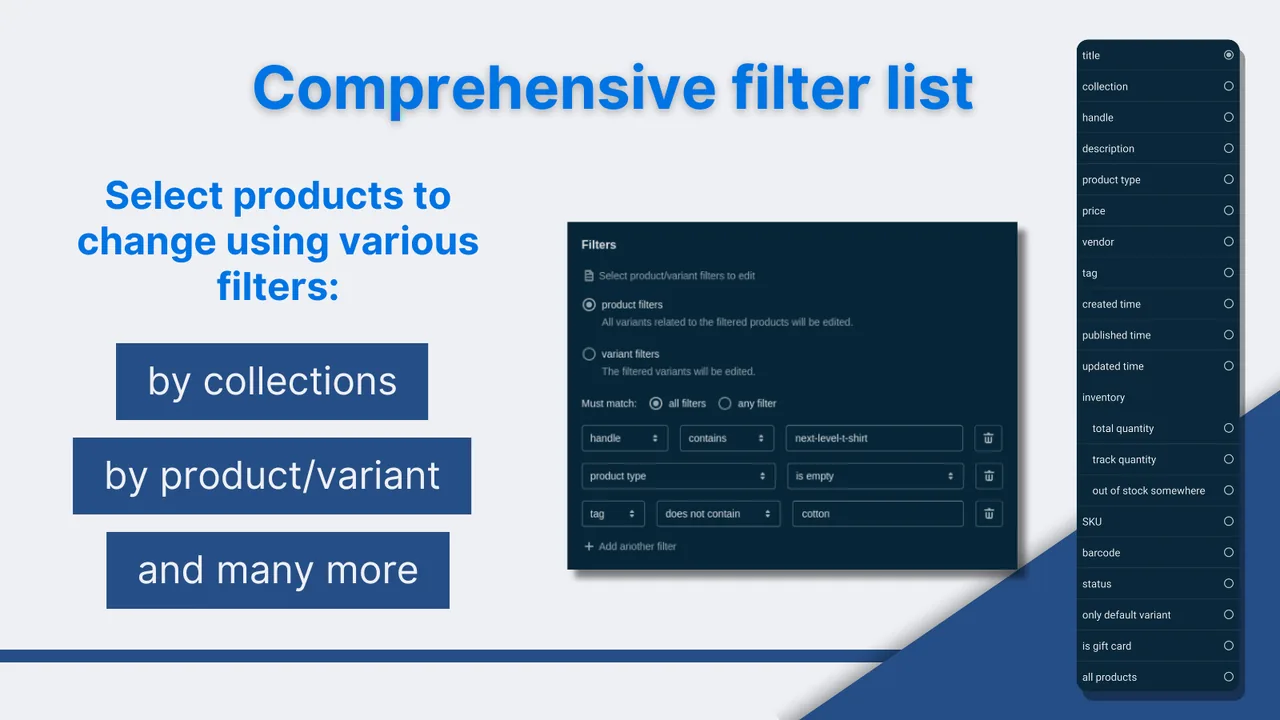
Choose product or variant filters — collection, tag, vendor, type, price, SKU, barcode, status, inventory, option values, dates — combine them with “all” or “any”, then preview exactly what was matched and exclude anything you do not want.

2

Describe the edit

Pick the fields and how they change: set, increase, decrease, base one field on another, find and replace, add or remove text and tags. A calculation example shows the old and the new value before anything is written.

3

Schedule and forget

Run it now, or set a start time and a revert time so a sale turns itself on and off. Recurring tasks repeat on the weekdays and time you pick.

Product and variant filters in Bulk Product Edit by MITS

Nothing here is a one-way door

Bulk editing goes wrong when you cannot see what happened. Every task keeps its own record.

Rollback, manual or scheduled

Revert a finished task with one click, or set the revert time up front so discounted prices return to normal the minute the promotion ends.

A log of every field

Each task lists the product, the variant, the property, the old value and the new one, plus a separate list of items that were skipped and why.

Told when it finishes

Long tasks run in the background and email you when they are done, so you are not watching a progress bar while seventy thousand variants update.

What merchants say

4.5 out of 5 from 31 reviews on the Shopify App Store.

★★★★★

“The app’s advanced filtering, scheduling, and rollback features streamline our operations and reduce manual work. Its integration with Shopify Flow allows us to automate recurring edits.”

SwedishCandy4UB2B wholesaler, Sweden
★★★★★

“Now we can update prices in bulk, run promotions on collections, and even schedule automatic price reverts after the sale. This app really saves us a lot of time.”

NutrigeekUnited States
★★★★★

“An accurate, cost effective solution for price editing with price rounding options. Compared to our previous CSV edit/import method the time savings are huge.”

Whites Forestry EquipmentAustralia

Pricing that follows the size of your catalog

Start free. Paid plans raise the number of products per task, the number of tasks per month and how many recurring schedules you can keep running.

Free
$0
forever
  • 10 products or variants per task
  • 5 tasks per month
  • No scheduler, no recurring tasks
  • No task history
Basic
$3.99
per month
  • 1,000 products or variants per task
  • 45 tasks per month
  • Scheduler + 2 recurring tasks
  • 30 days of task history
Plus
$14.99
per month
  • 70,000 products or variants per task
  • Unlimited tasks
  • Scheduler + 7 recurring tasks
  • 90 days of task history

All plans include filters, the scheduler, rollback and task logs. Compare the plans in detail.

Common questions

Is there a free plan?

Yes. The Free plan runs 5 tasks a month on up to 10 products or variants each, so you can rehearse the whole flow — filters, editors and the result — before paying anything. The scheduler, recurring tasks and task history start on the paid plans.

Can I undo a bulk edit?

Yes. Every task stores the old value of every field it touched. You can revert a finished task manually, or set a revert date when you create it so prices roll back on their own after a sale.

How do I select only the products I want?

With product and variant filters: collection, tag, vendor, product type, title, handle, price, SKU, barcode, status, inventory, option values, creation and update dates. Filters combine with “match all” or “match any”, and you can preview the selection and exclude single products by hand.

Does it work with multiple locations?

Yes. Inventory edits target a specific location and are written with a reason code, so the change shows up correctly in Shopify’s inventory history.

Can edits run automatically?

Recurring tasks repeat on the weekdays and time you choose, and the app is a Shopify Flow connector, so bulk edits can also be triggered from your own Flow workflows.

Stop editing products one by one

Install Bulk Product Edit by MITS and run your first bulk edit in minutes. Free plan available.

You will be redirected to the Shopify app store.