A recurring task runs the same filter and the same editors on a timetable. The filter is evaluated each time it runs, so the task follows the catalog rather than a frozen list of products from the day you created it.
That difference matters: “everything in the clearance collection” means whatever is in clearance this week, not what was there in March.
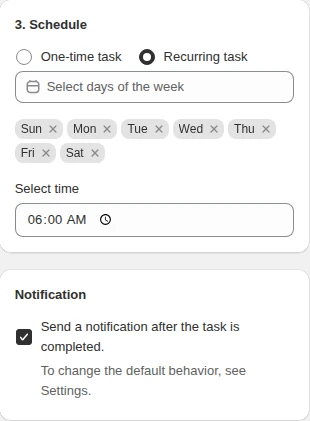
How a recurring task is configured
- Pick the weekdays it should run on — any combination, or every day.
- Pick the time it runs.
- The task list shows the next start time and whether the schedule is active or stopped.
- Schedules can be stopped and restarted without rebuilding the task.
- Plans allow two, three or seven active recurring tasks (Basic, Standard, Plus).
Turn your weekly promotion into a schedule instead of a reminder.
You will be redirected to the Shopify app store.
Jobs worth repeating
- A weekly promotion on a collection that changes membership each week.
- Re-applying a margin rule so new products inherit your pricing policy.
- Tagging products that just went out of stock, so the storefront can treat them differently.
- Drafting products that have been at zero inventory for a while.
- Backfilling SEO fields on products added since the last run.
A worked example: a standing Friday promotion
- Filter: collection is “Weekend deals”, inventory quantity more than 0.
- Editor: compare-at price → set the same as the price; price → decrease by 15%, round to .99.
- Recurring: every Friday at 00:00.
- A second recurring task at Monday 06:00 restores prices from compare-at and clears it.
- Membership of the collection can change all week; each run picks up whatever is in it at the time.
Keep an eye on the log
A recurring task is the one place where a small mistake repeats itself, so check the first two or three runs in the task history before trusting it.
History is kept for 30 to 90 days depending on the paid plan, which is what makes an audit of “what changed and when” possible at all.
How to create a recurring bulk edit, step by step

- Build the task as usual. Filters, editors and a preview.
- Make it recurring. Switch the schedule from one-time to recurring, pick the weekdays and the time it should run.
- Save. It appears under Recurring tasks as active; stop it there at any time.
Recurring tasks that pay for themselves
| Schedule | Task |
|---|---|
| Every Monday 06:00 | Reprice from cost per item after the weekly supplier cost update |
| Every Sunday 23:00 | Remove tag new from products created more than 30 days ago |
| Every day 02:00 | Set policy to deny for variants out of stock |
| Every Friday 08:00 | Add tag weekend-pick to in-stock products of the featured vendor |
Plans include 2 recurring tasks on Basic, 3 on Standard and 7 on Plus. Each run appears in task history like any other task, so a run that went wrong can be reverted. A recurring task does not carry its own revert time; for a sale that starts and ends on fixed dates, use a one-time task with a revert time.
Recurring tasks or Shopify Flow?
Use a recurring task when the trigger is the calendar. Use Shopify Flow when the trigger is an event — a product created, inventory low, a tag added — and let Flow start the bulk edit.
Related guides
How to schedule a sale
Give a price change a start time and a revert time so it ends by itself.
Read moreHow to trigger edits from Shopify Flow
Trigger rule-based bulk edits from Flow workflows, with the log and revert intact.
Read moreBulk edit templates
Ready-made bulk edit setups for Shopify: seasonal discounts, margin-based repricing, tag cleanups, SEO backfills, inventory corrections and end-of-sale rollbacks.
Read more