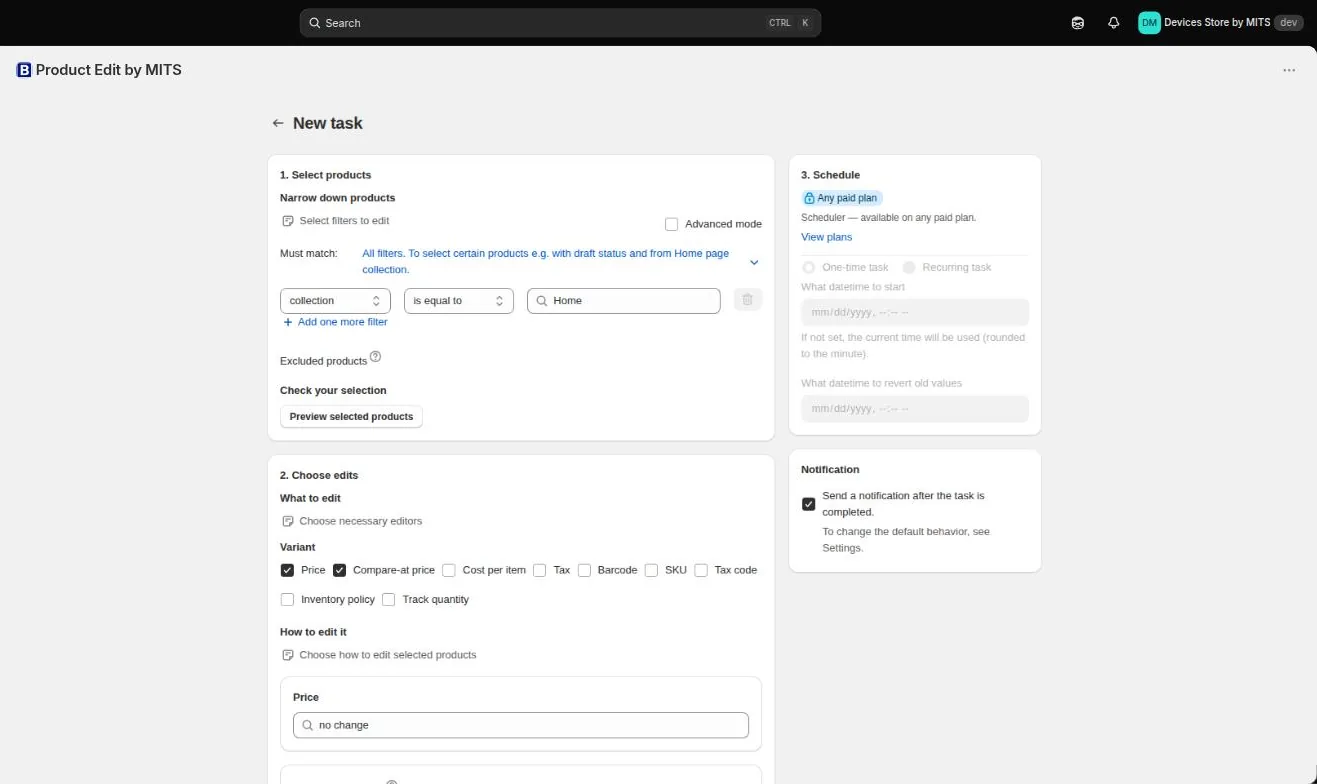
The Schedule panel sits to the right of the editors on the New task screen. It is available on the paid plans; on the free plan the same task runs immediately instead.
Step by step
- Build the task as usual. Filter the products, then set compare-at price from price and reduce the price by your discount.
- Choose One-time task. In the Schedule panel, select the one-time option.
- Set the start time. Enter the date and time the sale should begin. Leave it empty and the task runs now.
- Set the revert time. Enter when the previous values should be written back. This is what makes the promotion end on its own.
- Leave notifications on. The app emails you when the task completes, which is how you find out it ran without watching for it.
- Verify in the task list. Open Tasks and confirm the task shows both the start and the revert time before you walk away.
Follow the steps in your own store — the free plan covers ten products per task.
You will be redirected to the Shopify app store.
Rules the app enforces
Neither time can be in the past, and the revert time cannot be before the start time — the form rejects those combinations when you save.
Ending it early
A scheduled revert is a convenience, not a lock. You can revert the task manually from the task list at any point, and the scheduled revert simply has nothing left to do.
Related tutorials
Schedule price changes on Shopify
Give a price change a start time and a revert time so it ends by itself.
Read moreHow to create a recurring bulk edit
Weekdays, a time, and the checks that keep a repeating edit safe.
Read moreRun a flash sale on Shopify
Set up a few-hour sale with automatic start, badge tag and rollback.
Read more